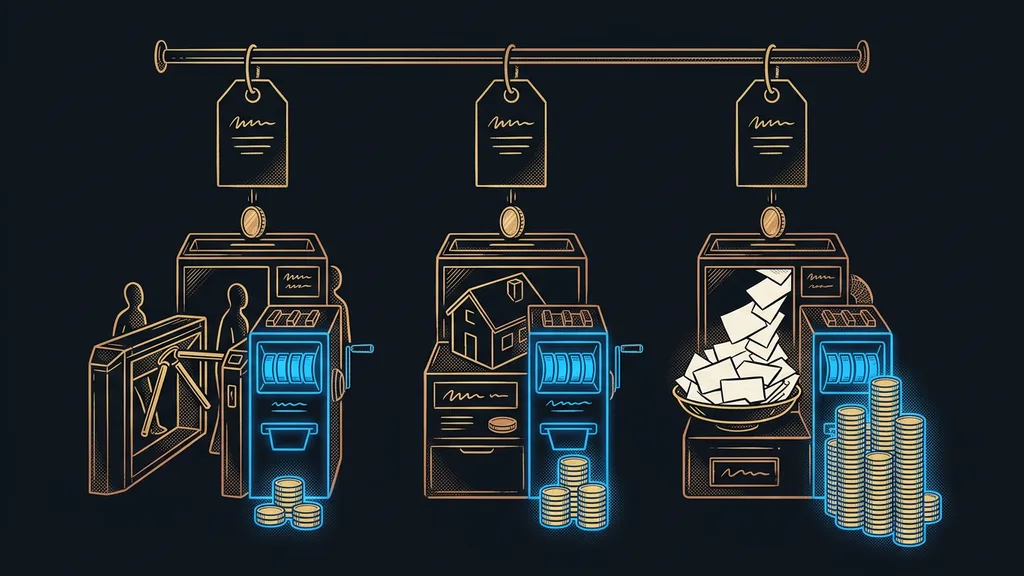
CRM price lists are almost impossible to compare. One platform charges per user, another for the whole account, a third by the number of contacts in your database. So two businesses of the same size can pay very different amounts every month on two systems with the same rate.
With clients whose systems I set up, I see the same mistake again and again. A business picks based on the number on the front page of the price list, adds three colleagues two months later, and gets a bill three times as high. The culprit was a line item nobody had multiplied, not some hidden fee.
Billing model first, rate second
A CRM’s price is always a number multiplied by something: the number of users, accounts, contacts, or emails sent. Until you know what a given platform multiplies by, the rate in the price list is just bait.
The table has six platforms a small Czech business actually runs into. I read the prices from the official price lists on September 19, 2026, and I’m leaving them in the currency each price list uses. I don’t convert dollars to koruna, because the exchange rate would turn them into a number that’s wrong a month later.
Six platforms and what their rate gets multiplied by
| Platform | What you pay for | Price as of Sep 19, 2026 | Free | Where it pinches |
|---|---|---|---|---|
| GoHighLevel | per account, not per person | $97 / $297 / $497 a month | only a 14-day trial | high entry price for solo users |
| RAYNET CRM | per user per month | CZK 449 or 949 (about €18 or €39) per user | trial only | automations and e-signatures cost extra |
| Ecomail | by number of active contacts | from CZK 150 (about €6) a month, billed annually | up to 200 emails a month | contact thresholds aren’t shown in the price list |
| HubSpot | per seat and add-on | not verified | basic CRM | steep jump to the paid version |
| Brevo | by volume of emails sent | not verified | with a daily cap | daily cap instead of a monthly one |
| SmartEmailing | by database size | not verified | not verified | the interface feels dated |
Billing model
The quantity the list rate gets multiplied by. On one platform it’s the number of users, on another the number of accounts, on a third the number of contacts in your database. Everyone remembers the rate; almost nobody remembers the billing model. Yet that’s exactly what decides how much you’ll pay by the end of the year.
“We chose based on the monthly price. Six months later, we’re paying three times as much, and we haven’t added a single feature.”
A small-business owner said this to me while complaining about an expensive CRM. What he was really complaining about was a billing model nobody had read beforehand. On the invoice, that model shows up more than the difference between a plain address book and a system that actually works with your contacts.
GoHighLevel: you pay per account, not per head
GoHighLevel charges for the whole account, not for individual users. So adding a colleague doesn’t raise the price, and for a growing team, that’s the biggest difference among all six.
Best for: a business with more than two people that wants CRM, websites, email, a booking calendar, and automations under one license.
In practice, it handles your whole sales process from inquiry to invoice without anyone copying data between tools. If you’re paying for five different subscriptions today that can’t talk to each other, this is the route where the number of invoices shrinks to one.
Where it falls short: the entry price is high and doesn’t make sense for one person with ten customers. There’s no free version, only a 14-day trial.
Price as of September 19, 2026: Starter at $97 a month with three sub-accounts, Unlimited at $297, Agency Pro at $497. I’ve broken down separately exactly what the license includes and what costs extra.
RAYNET: a Czech CRM billed per user
RAYNET is a Czech sales CRM with Czech-language support and pricing in koruna. It’s billed per user, so the price goes up with every person you let into the system.
Best for: a sales team of two to five people who mainly want order in their inquiries and don’t need a whole marketing stack behind them.
In practice, you track deals, quotes, and activities in it, and all of it is in Czech, support included. For a business that doesn’t want to deal with invoices from abroad, that saves a lot of hassle.
Where it falls short: automations and electronic signatures aren’t part of the plan. So the real price is higher than the one in the price list, and for a five-person team it adds up fast.
Price as of September 19, 2026: START at CZK 449 (about €18) a month per user, PROFESSIONAL at CZK 949 (about €39). Add-on modules: electronic signatures from CZK 250 (about €10) a month, automations from CZK 650 (about €27) a month. Five salespeople on the PROFESSIONAL plan come to CZK 4,745 (about €195) a month, and that’s before any modules.
Ecomail: the price grows with your contacts
Ecomail is a Czech email marketing tool that charges by the size of your database. That’s the most treacherous model of all six, because the database grows on its own and nobody notices from one month to the next.
Best for: a Czech online store or an instructor with online courses who mainly send emails and don’t need a heavy CRM.
In practice, you can send newsletters, an automated post-purchase series, and abandoned cart reminders from it. The interface and support are in Czech, and the pricing is in koruna.
Where it falls short: the word “from” in the price list applies to the smallest database. The price list doesn’t tell you exactly where the price jumps, so you have to keep an eye on that yourself.
Price as of September 19, 2026: free for up to 200 emails a month. The Profi plan starts at CZK 150 (about €6) a month with annual billing, or CZK 250 (about €10) with monthly billing. Marketer+ starts at CZK 200 (about €8), CDP at CZK 2,000 (about €82), both again with annual billing.
Active contact
An address you sent something to, or used in some other way, during a given period. These are the rows you pay for that month rather than every row in your database. The rule differs from platform to platform, which is why you can’t compare two price lists with the same rate until you’ve read it.
How I choose
I start with a list of work, not a price list. Write down five things the system should do instead of you: send a quote, send an appointment reminder, track due dates, send out a newsletter, fill in a contract from form data. Only then look for a platform that fits that list. Doing it the other way around means paying for modules nobody ever opens.
HubSpot: a free CRM you can grow out of
Among small businesses, HubSpot is known mainly for offering a basic CRM for free. For a business that still runs sales in a spreadsheet, it’s the cheapest way to get used to a system.
Best for: a new business that wants to track inquiries properly and doesn’t want to pay yet.
In practice, you set up contacts, deals, and notes in it and you’re done in an afternoon. But as soon as you reach for automation or email campaigns, you’re in paid territory.
Where it falls short: the jump from the free version to the paid one is steep, and it comes sooner than you expect.
Price as of September 19, 2026: I haven’t verified HubSpot’s pricing firsthand, so you won’t find a number here. Open it yourself before you decide.
Brevo and SmartEmailing: two names I won’t put a number on
For both platforms, I know the billing model but not the current rate. Billing models change far more slowly than numbers, though, so there’s still something to go on.
Best for: Brevo, if you want email, SMS, and a light CRM in one. SmartEmailing, for a Czech business that cares mainly about deliverability.
With Brevo, watch out for one thing: the free plan caps emails sent per day, not per month. A one-off send to your whole database won’t fit, even if you’re nowhere near a monthly limit.
SmartEmailing is a Czech service with a strong focus on deliverability. Its interface feels more dated than the competition’s, which bothers some people and doesn’t bother others at all.
Price as of September 19, 2026: not listed. I didn’t read either price list from an official source, and a guessed number is worse than none.
Who none of these will help
For some people, it isn’t worth it, and it’s only fair to say so. If you have twenty customers and know them all by name, a CRM adds nothing at all. The rate may be low, but the cost of a system is more than the subscription. Above all, it’s the time you have to put in once so the data in it is actually true.
Likewise, it’s not worth switching to save about €8 a month. If you already have a system and people work in it, the few euros you save will vanish into the data migration. Switching pays off when your current system gets in the way of your work, not when it’s a little more expensive. I’ve laid out exactly where that line is in my comparison of the alternatives.
The whole selection in a nutshell
- First, write down five things the system should do instead of you.
- For each platform, find out what the rate is multiplied by: users, accounts, contacts, or emails.
- Calculate the price for where you’ll be in a year, not for today. Databases and teams grow.
- Add the modules that aren’t in the plan: automations, signatures, AI features.
- Only then compare the numbers, and only in the currency each price list is issued in.
Let’s go back to that bill from the beginning, the one three times as high. It came from a number nobody multiplied, not from an expensive platform. The rate in the price list won’t tell you what you’ll pay. The question of what that rate gets multiplied by will, and you can ask it in ten minutes.